Efficient image conversion and batch processing tool

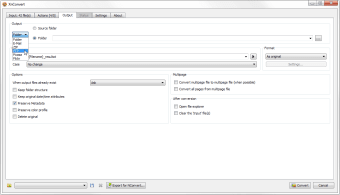
XnConvert, developed by XnSoft, is a free image conversion application designed to streamline batch processing and basic editing tasks. Supporting a broad range of image formats, the software allows users to convert, resize, and transform multiple images simultaneously. Additional features such as watermarking, color adjustments, and filters are integrated directly into the interface. With its combination of functionality and accessibility, XnConvert offers a practical solution for users seeking to simplify repetitive image processing workflows.

Top Recommended Alternative
Streamlined batch processing and core functions

XnConvert focuses on handling multiple images efficiently by enabling batch conversion and editing in a single session. Users can apply resizing, format changes, and other transformations to large groups of files at once, saving time and effort. The program supports hundreds of input formats and dozens of output options, providing flexibility for different file types. Its interface is designed to make these tasks approachable, ensuring that both beginners and more experienced users can navigate functions without difficulty.

Integrated editing features for enhanced output

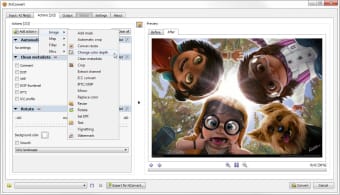
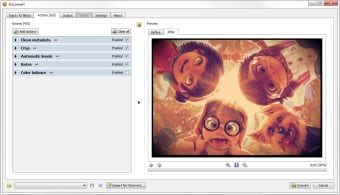
Beyond basic conversion, XnConvert offers tools for watermarking, color correction, and filter application. These features are accessible within the same interface, eliminating the need for separate programs or modules. Users can create consistent output across multiple images while maintaining a simple, unified workflow. The software runs across major desktop platforms, making it versatile and suitable for various operating systems without additional configuration.

Final thoughts

XnConvert delivers a robust and free option for image conversion and batch processing. Its broad format support, integrated editing features, and straightforward interface make it a dependable tool for both casual users and professionals. By combining efficiency with ease of use across platforms, XnConvert remains a practical solution for streamlining repetitive image processing tasks without unnecessary complexity.


  • Pros

    • Free and versatile across major desktop platforms
    • Supports batch processing and extensive format conversions
    • Integrated tools for watermarking, color adjustment, and filters
    • Intuitive interface suitable for users of all skill levels
  • Cons

    • Limited advanced image editing beyond basic adjustments
    • Interface is functional but not optimized for creative design workflows
    • May require familiarity with batch processing concepts for larger projects
 0/3

App specs

Also available in other platforms

Program available in other languages


Icon of program: XnConvert

XnConvert for PC

  • Free
  • 3.5
    139
  • 77.8K
  • V1.106.0.0

User reviews about XnConvert

3.5

1 reviews

Add review

Main reviews for you

  • Anonymous user

    Absolute top notch batch image converter, not only are there a plethora of formats to choose from, it even has great file size optimization. Say you have a huge library of textures that are compressed jpegs but still big in file size for some reason, you can quite literally cut the size in half while looking virtually identical. Super fast conversions with multiple thread support and filters/adjustments you can add on top.

More

You may also like

Alternatives to XnConvert

Explore Apps

Latest articles

Laws concerning the use of this software vary from country to country. We do not encourage or condone the use of this program if it is in violation of these laws.


Softonic

Is XnConvert safe?

99/100

Score result: Clean

This file passed a comprehensive security scan using VirusTotal technology. It is safe to download.

  • Virus free
  • Spyware free
  • Malware free
  • Verified by Security Partners

    VirusTotal logo

Scan Info

Last scan
Wednesday, January 7, 2026
Scan provider
VirusTotal · Full report

File Integrity

File
1.106.0.0.exe
SHA256
44098499d5df8d6fef58cca4940d3386ca43a5981175f5df9c69825a99292f37
SHA1
ff3d8c3522f6421fe42b4db0adba299d71d40a5e

Softonic security commitment

XnConvert has been thoroughly scanned by our advanced security systems and verified by industry-leading partners. This file comes from the official developer and has passed all our security checks, showing no signs of viruses, malware, or spyware. For more information, visit our Security and Trust Center